
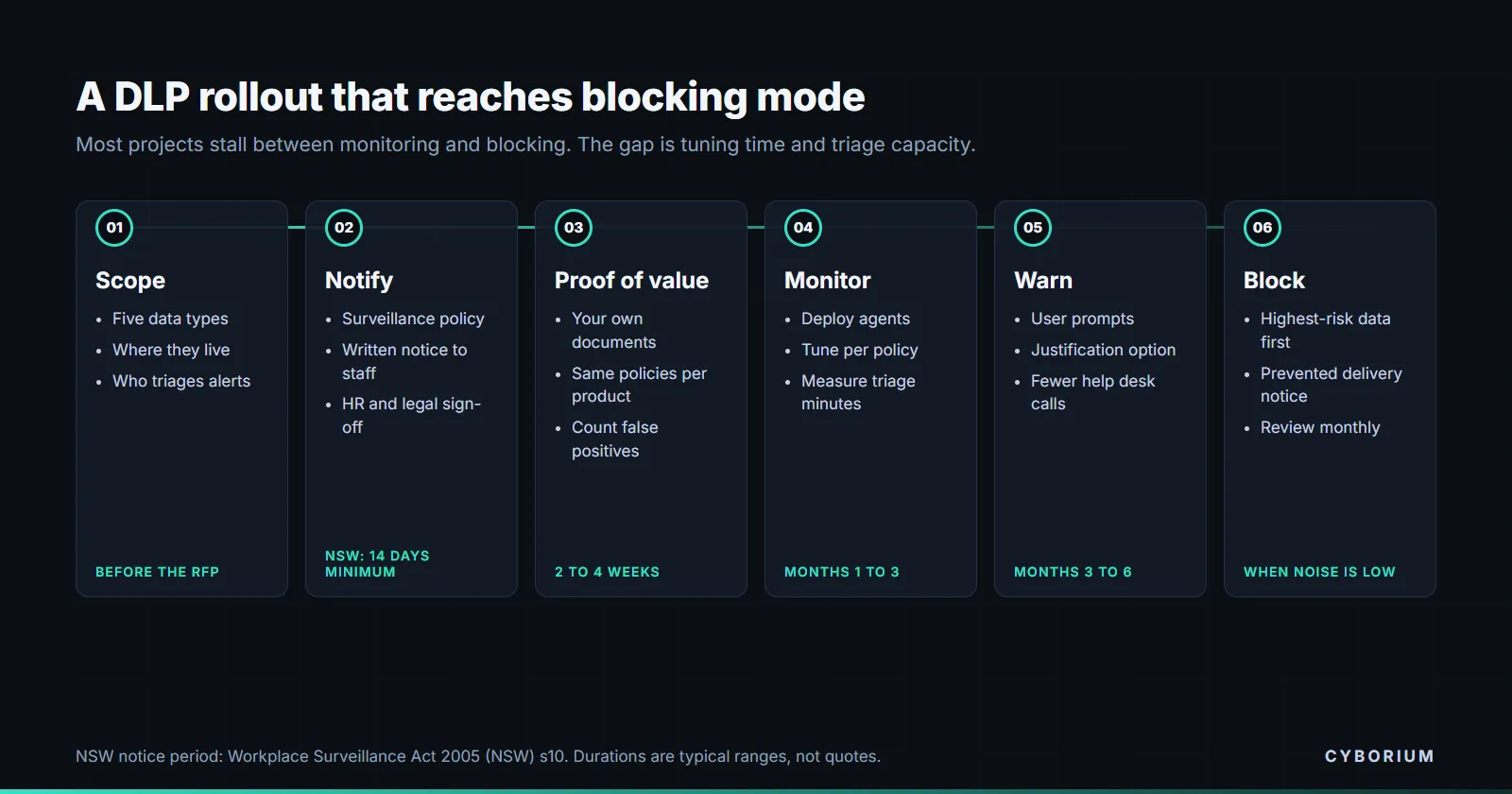
Most data loss prevention projects are bought for blocking and end up running in monitor mode forever. The product is rarely the reason. The data was never classified, the alert volume swamped the team, or HR and legal were brought in after the agent was already on every laptop. This guide covers how to buy DLP in Australia so that it gets switched on and stays on.
What DLP covers in 2026
Data loss prevention inspects content as it moves and applies a policy: allow, warn, encrypt, block or log. The channels that matter now are wider than when DLP was an email gateway feature.
- Endpoint: copying to USB, printing, uploading through the browser, and pasting into applications, including generative AI tools.
- Email: outbound messages and attachments.
- Web and network: uploads to websites and file sharing services, which usually requires TLS inspection at the gateway.
- Cloud applications: sanctioned SaaS such as file storage and collaboration tools, inspected through APIs, plus unsanctioned apps seen through a cloud access security broker.
- Classification and labelling: the foundation for all of the above. A DLP policy is only as good as its ability to recognise what is sensitive.
Three ways to buy it
| Route | Where it fits | What to watch |
|---|---|---|
| Bundled in your productivity suite licence | Organisations already standardised on one suite, whose sensitive data mostly lives inside it | Often requires the top licence tier for every user in scope. Coverage outside the suite’s own apps and operating systems can be thin. |
| Part of a security service edge or SASE platform | Organisations routing web and cloud traffic through one platform | Strong on web and cloud channels, weaker on endpoint actions such as USB and print unless the platform has its own agent. |
| Standalone specialist DLP | Regulated organisations with complex data, mixed platforms or intellectual property to protect | Deepest detection and policy control, but another agent, another console and more tuning effort. |
Bundles look cheap because the licence is partly paid for already. Price the full user uplift, the classification work and the tuning effort before comparing them with a standalone product. Our guides to SASE and data security platforms cover the adjacent categories.
Before the RFP: decide what you are protecting
A DLP tender that starts with “protect all sensitive data” produces demos that detect credit card numbers and not much else. Start narrower.
- Name five data types whose loss would hurt most: for example customer identity documents, health records, pricing models, source code, board papers.
- Find where they live and how they move. Which systems hold them, and which channels people genuinely use to share them.
- Choose monitor or block per data type. Blocking everything on day one is the fastest route to exceptions for everyone.
- Bring HR, legal and privacy in now. In some Australian jurisdictions, DLP on employee devices counts as workplace surveillance.
- Agree who will triage alerts, and how many hours a week they have. That capacity sets the ceiling on how many policies you can run.
The Australian twist: workplace surveillance law
Endpoint and email DLP monitor what employees do on work systems. In New South Wales, the Workplace Surveillance Act 2005 applies.
- Section 10: surveillance must not start without written notice to the employee, given at least 14 days before it begins, stating the kind of surveillance, how and when it will be carried out, and whether it is continuous or ongoing.
- Section 12: computer surveillance must follow an employer policy that employees have been notified of in a way that makes it reasonable to assume they understand it.
- Section 17: an employer must not block delivery of an employee’s email unless it acts under a notified email and internet policy and, in general, gives the employee a prevented delivery notice as soon as practicable. There are exceptions, such as spam and malicious content.
The ACT has comparable obligations under the Workplace Privacy Act 2011. The practical effects on procurement are specific: the product must be able to notify the sender when it blocks an email, the rollout plan must include the notice period, and the policy document is a deliverable with its own owner. None of this is hard if it is planned. All of it delays go-live if it is discovered in week six. This is general information; get advice for your own workforce and states.
DLP keeps copies of your most sensitive data
When a policy fires, most DLP products store evidence: the file, a snippet of the matched content, or a screenshot. That means the incident store ends up holding samples of exactly the data you set out to protect. Treat it like any other sensitive repository.
- Where is incident evidence stored, and can it be kept in Australia?
- How long is it retained, and can you set that per policy?
- Who can view evidence in the console, and is every view logged?
- Can evidence capture be switched off for categories such as health information, keeping only the metadata?
Under APP 11 you need reasonable steps to protect personal information, and that includes copies sitting in a security tool. See our guide to information security in procurement for the contract clauses on data location and access.
How to evaluate DLP products
Run the proof of value on your own data
Vendor demos use clean test files. Give each shortlisted product a representative sample of your real documents, including the awkward ones: scanned PDFs, spreadsheets with mixed content, images of identity documents. Run the same policies on each for two to four weeks in monitor mode.
Measure false positives and analyst time
Count alerts per policy, the share that were genuine, and the minutes it took to triage each one. A product that finds slightly more but generates three times the noise will be tuned down until it finds less. These numbers are the best predictor of whether blocking ever gets enabled.
Test the channels people actually use
Check browser uploads to personal cloud storage, pasting into generative AI tools, printing, and copying to USB, on every operating system you run. macOS and Linux coverage is where endpoint agents most often differ from their datasheets.
Check the user experience of a block
When a policy warns or blocks, what does the employee see? A clear message with a justification option cuts help desk calls and, in New South Wales, supports the prevented delivery notice obligation for email.
Commercial terms worth negotiating
- Licence metric. Per user, per device or per mailbox, and what happens to contractors and shared accounts.
- True-ups. How growth is counted and when it is billed.
- A funded tuning phase. Most of the value arrives in the first three to six months of policy tuning. Ask for vendor or partner hours to be included, with named outcomes.
- Bundle exit. If DLP comes inside a larger platform deal, price what it would cost to keep DLP and drop the rest, or the reverse.
- Policy export. Your policies, dictionaries and exceptions are months of work. Make sure they can be exported in a usable form at the end of the contract.
Why it matters now
The OAIC received 1,205 data breach notifications in 2025, the highest annual total since the scheme began. Malicious or criminal attacks caused 59%, and the remainder were attributed to human error or system faults, where outbound controls like DLP help most. Email sent to the wrong person and files shared with the wrong link are the everyday cases DLP is built to catch. Our guide to email security procurement covers the inbound side.
Frequently asked questions
What is data loss prevention?
Data loss prevention (DLP) is technology that identifies sensitive information as it is used, stored or sent, and applies a policy such as warning the user, encrypting, blocking or logging the action. It covers endpoints, email, web traffic and cloud applications.
Is DLP legal to use on employees in Australia?
Generally yes, with conditions that vary by state. In New South Wales, the Workplace Surveillance Act 2005 requires written notice at least 14 days before computer surveillance begins, a notified policy, and in general a notice to the employee when their email is blocked. The ACT has similar requirements. Take advice for your own situation.
Should we use the DLP included in our productivity suite?
It can be the right choice if most sensitive data lives inside that suite and you already hold, or are prepared to buy, the licence tier it requires. Compare it with alternatives on detection quality with your own data, endpoint coverage across your operating systems, and total cost including classification and tuning.
How long does a DLP rollout take?
Deploying agents and connectors can take weeks. Reaching a point where policies block with an acceptable false positive rate usually takes several months of tuning, which is why the tuning phase should be scoped and funded in the contract.
Official sources and update status
- Workplace Surveillance Act 2005 (NSW), sections 10, 12 and 17
- Workplace Privacy Act 2011 (ACT)
- APP 11 guidelines on security of personal information, OAIC
- Data breach notifications increase to all-time high in 2025, OAIC, 6 July 2026
- Information Security Manual, Australian Signals Directorate, including the guidelines on gateways and data transfers
Information status: legislation and statistics checked on 27 September 2026. This is general information rather than legal advice; workplace surveillance obligations differ between states and territories.
Shortlisting DLP products and want the proof of value run on your own data? Talk to CYBORIUM.
Last updated: